How to get strong WiFi in every room of your home
If your WiFi is fast by the router but crawls in the back bedroom, the fix usually isn't a faster internet plan, it’s better WiFi coverage.
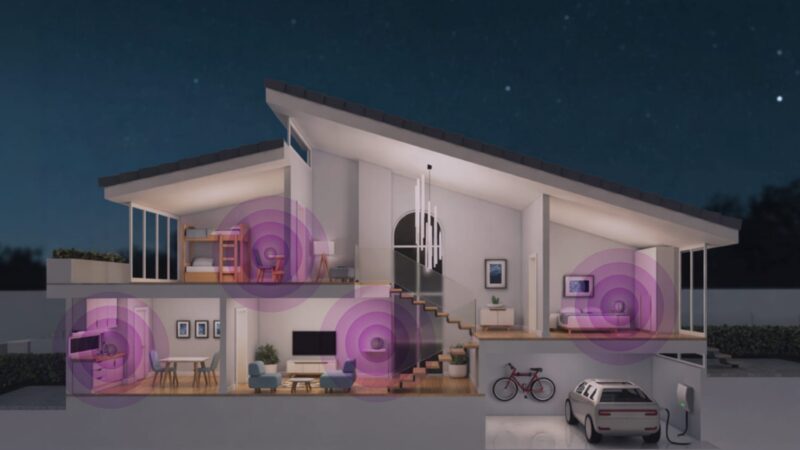
If your WiFi is fast by the router but crawls in the back bedroom, the fix usually isn’t a faster internet plan, it’s better WiFi coverage. Start by moving your router to a central, open, elevated spot; connect close-up devices to the 5 GHz band and distant ones to 2.4 GHz; reduce interference from walls, appliances, and neighbors’ networks; and add a mesh point for the rooms your signal can’t reach. Here’s how to do each step.
We set up homes all over the San Gabriel Valley, from older houses with thick plaster walls to two-story homes where the signal has to travel a long way. We’ve seen just about every kind of dead zone and most are fixable in an afternoon.
Step 1: Move your router to a better spot
Router placement is the single biggest factor most people can control. WiFi radiates outward and downward, and it’s absorbed by walls, floors, metal, and water. A router tucked in a closet or behind the TV in a corner is fighting your whole house.
- Put it as central as possible. The middle of your home, not an outside wall.
- Get it up high. A shelf or table beats the floor.
- Keep it in the open. Not inside a cabinet or behind furniture.
- Keep it away from microwaves, cordless phones, and big metal appliances.
Step 2: Use the right band
Modern routers broadcast on at least two bands, and they behave differently. Using the right one for each device makes a real difference.
2.4 GHz
Reaches farther and passes through walls better, but is slower and more crowded. Best for distant devices and simple smart-home gadgets.
5 GHz (and 6 GHz)
Much faster with less interference, but shorter range. Best for phones, laptops, and TVs near the router. Many systems now steer devices to the best band automatically, including Giggle WiFi+.
Step 3: Cut down on interference
Thick walls, mirrors, aquariums, metal shelving, and even a neighbor’s overlapping network can weaken your signal. In denser neighborhoods and apartment buildings, congestion from nearby networks is a common culprit. A modern router or managed WiFi system will simply pick a cleaner channel for you.
Step 4: Add mesh coverage for the rooms that need it
If you’ve optimized placement and bands and still have a dead zone, it’s time to extend coverage. A mesh WiFi system uses two or more units that blanket your home in a single, seamless network, so you keep full speed as you move from room to room. No more switching networks or dropping calls on the stairs.
This is exactly what Giggle WiFi+ is built for: whole-home coverage with app control, automatic band steering, and a local team that can help you place everything for the best result. If you’d rather not tinker, we’ll handle it.
Step 5: Keep your equipment current
WiFi standards improve every few years. Older routers can bottleneck a fast plan and struggle with the number of devices in a modern home. If your equipment is more than about five years old, upgrading often solves speed and coverage problems at the same time. With Giggle WiFi, your equipment stays current and supported, so you’re not buying a new router every few years.
When it’s the plan, not the WiFi
Sometimes weak performance really is due to the plan. This usually happens when too many people and devices are online at once. If that sounds like your home, it may be time to size up. Not sure which it is? A quick call to our local team will sort it out in no time.
Frequently Asked Questions
Where is the best place to put my WiFi router?
As central to your home as possible, up high, and out in the open. Not in a closet, cabinet, or corner against an outside wall. Keep it away from microwaves and large metal appliances, which interfere with the signal.
What’s the difference between 2.4 GHz and 5 GHz WiFi?
2.4 GHz reaches farther and passes through walls better but is slower; 5 GHz is much faster with less interference but shorter range. Use 5 GHz for nearby devices like phones and laptops, and 2.4 GHz for distant or simple smart-home devices.
Will a mesh WiFi system fix dead zones?
Usually, yes. Mesh systems use multiple units to blanket your home in one seamless network, keeping full speed as you move between rooms. They’re the most reliable fix once router placement and band choice are optimized.
Do I need a new router, or is my internet plan the problem?
If speed is fine near the router but weak far away, it’s a WiFi coverage issue. If everything slows down when many devices are online at once, it may be the plan. Giggle’s local team can help you tell the difference.

Home network security: how to protect your whole home
Most people secure their phone and laptop and stop there, but the average home now has dozens of connected devices,…
Read the article